Choosing a TV box: certified Google TV and Android TV vs generic Android boxes
Why some Android TV boxes play Netflix only in SD, how to check certification, and what to look for in remote, Wi-Fi and storage.
Updated 2026-11-27
Android TV boxes fall into two groups that look the same in a listing photo. Certified devices run Google TV or Android TV with Google's licensed apps and have passed Google's compatibility testing. Uncertified boxes run a generic build of Android (often a phone version, sometimes with "TV" in the name) without that approval. The difference decides whether your streaming apps install, whether they play in HD, and how safe the box is on your home network.
What certification gets you
Google's Play Protect certification page says a certified device includes Google's licensed apps and has passed Android compatibility testing, and that only certified devices can include apps such as the Play Store. It also says uncertified devices may be less secure, may not get Android system or app updates, and that some apps and features may not work correctly.
How to check a box you already own: open the Play Store, tap your profile icon, go to Settings, then About, and look at the certification line. Google's page explains this step by step.
Why Netflix may play only in SD
Paid streaming services protect video with DRM, and on Android that's Google's Widevine system. Netflix's Android help page says HD playback needs Widevine L1, while a device with only L3 is limited to standard definition. The same page says devices that are rooted or run a modified OS may not be able to download the app, and that changes to the OS or its certification status can stop the app working properly.
You can see your level inside the Netflix app: Netflix's page points to App Settings, then Diagnostics, then Playback Specification. If it says L3, no setting will get you HD on that box.
Even on a certified box, everything in the chain counts. Netflix's video quality page says your plan, the device, the HDMI cable and port and your internet speed all have to support the quality you want; 4K and HDR need an HDMI port with HDCP 2.2 or later. If any link falls short, Netflix plays at the best quality that link supports.
Many cheap boxes advertise "4K" or "8K decode". That describes the chip's video decoder, not what licensed apps will stream. A box can decode 8K files from a USB stick and still be capped at SD in Netflix.
Security: the bigger reason to avoid no-name boxes
In June 2025 the FBI warned that TV streaming devices, digital projectors and other home gadgets, mostly made in China, were being turned into a criminal proxy network (BADBOX 2.0). Some had malware before they were sold; others picked it up during setup or from unofficial app stores. The FBI's warning signs include devices that aren't Play Protect certified, setups that ask you to turn off Google Play Protect, apps from unofficial marketplaces, unrecognisable brands, and boxes advertised as "unlocked" or offering free content.
That overlaps with piracy. The FTC's consumer alert says illegal streaming apps and add-ons often bring malware that can spread to other devices on your network, including the computer you bank on. Use a box only for services you pay for or that are free and legal, install apps only from the Play Store, and walk away from any box sold on "free channels".
The rest of the checklist
- Remote. A Bluetooth remote with a microphone gives you voice search and works without pointing at the box. Infrared remotes are cheaper and need line of sight. Check whether the remote can control TV power and volume, or you'll juggle two.
- Wi-Fi and Ethernet. Streaming 4K over a congested 2.4 GHz network is a common source of buffering. A box with 5 GHz Wi-Fi or Wi-Fi 6, or an Ethernet port, gives you room. If the router is far away, wired is the fix.
- Storage and memory. Apps, updates and cached data fill small storage quickly, so if you plan to install more than a couple of apps, pick a box with more storage and memory. The numbers in listing titles (such as 4GB/32GB) usually mean RAM/storage.
- Android version and updates. A recent Android version means little without updates. Certified devices are the ones most likely to keep receiving them, per Google's certification page above.
- Region plug. Many listings come in EU, UK, AU and US plug versions. Pick the one for your country.
Setting up a new box safely
- Before signing in to anything, open the Play Store and run the certification check described above.
- Install Netflix or your main paid service and look at its playback specification, so you know within the return window whether HD works.
- Leave Google Play Protect switched on, and decline any prompt to install apps from "unknown sources".
- Install system updates if the box offers them, and note whether any arrive in the first few months.
- If the box shows signs from the FBI's list, such as unexplained network traffic or apps you didn't install, disconnect it and return it.
Which kind should you buy?
- Main TV, paid services in HD or 4K: buy a certified Google TV or Android TV device, or a mainstream streaming stick. Confirm certification from the brand or the Play Store check after setup, and keep the receipt.
- Second TV, local files, free legal apps: an uncertified budget box can do this job, as long as you accept SD from paid apps and keep it away from unofficial app stores.
- Any box that asks you to disable Play Protect or sideload a "streaming pack": return it.
From our TV box listings
Our TV, streaming and audio section includes budget boxes from Geekbuying. Most are generic Android boxes; listing titles don't say whether a box is Google-certified, so treat any box as uncertified until the Play Store check shows otherwise.

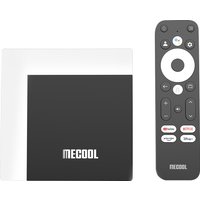
MECOOL boxes in our listings. Their titles don't state certification either, so run the same checks before relying on HD streaming:



See all TV, streaming & audio →
Related: Projector buying guide · Secure your smart home network